

FairPlay Login Password — Safe Reset When the Lock Kicks In
A FairPlay login password reset takes one WhatsApp text: your username to +91 81097 11726, and roughly 5 minutes later a temporary password is back in that chat. Swap it at sign-in for one of your own, 8 characters with a number. Five misses in a row? The lock lifts after 30 minutes.
Fast FairPlay Login Password Reset Request Card
Only one detail travels to the desk: the FairPlay username you already hold. No old password. No code from your phone. This card mirrors the boxes you fill at the FairPlay sign-in once the temporary password lands in WhatsApp, which is usually about five minutes after you ask for it.
These boxes are a locked mock of the reset screen. The real typing happens later, at the FairPlay sign-in, after the desk has replied.
Safe FairPlay Login Password Reset in Three Steps
No inbox is involved in a FairPlay login password reset, because there is no email on the account to send one to. FairPlay IDs are opened without it (the My FairPlay register page lists what sign-up does ask for), so the reset runs through the same WhatsApp line that handed out the ID.
- Send the username. Open the chat with +91 81097 11726 (the thread your ID first arrived in, if it is still on the phone) and type your FairPlay username followed by reset.
- Wait for the temporary password. About 5 minutes, usually. It lands as a reply under your message, and that is the string you copy.
- Set your own password. Open the FairPlay sign-in, enter the username with the temporary password, and choose a new one of 8 or more characters with a number in it.
Five minutes is the usual gap. It is not a guarantee. The desk works 24x7 and normally answers a first message within roughly two minutes; on a big match night that reply can stretch to about six, and resets wait behind new IDs, deposits and withdrawals in the order set out on the FairPlay login number page, so give a final-over evening a little longer before you chase.
Composite example 9:41 pm, username sent. 9:46 pm, temporary password in the chat. By 9:48 pm a fresh ten-character FairPlay password with two digits is saved and the cricket market is open again.
Finish step three in one sitting. If you close the tab halfway, you are left holding only the temporary password from the chat, and that is a poor thing to be relying on when the next over starts.
Write the reset message the way the desk reads it fastest: your username on one line, the word reset after it. A chat that opens with hi, waits for an answer, and only then gives the username costs a round trip, and on a busy night one round trip can be several minutes. Sending a mobile number in place of the username means the desk has to look the ID up before it can do anything. Capitals in the username do not matter. Spelling does, so check it before you send.
The temporary password works at whichever FairPlay sign-in you prefer, the app or a browser, on any live address the desk has confirmed. Use the one you will keep using. Lost the username as well? Say so in the chat; a completely new FairPlay ID is only issued when the old login and the old mobile are both gone, as the FairPlay ID page sets out further down.
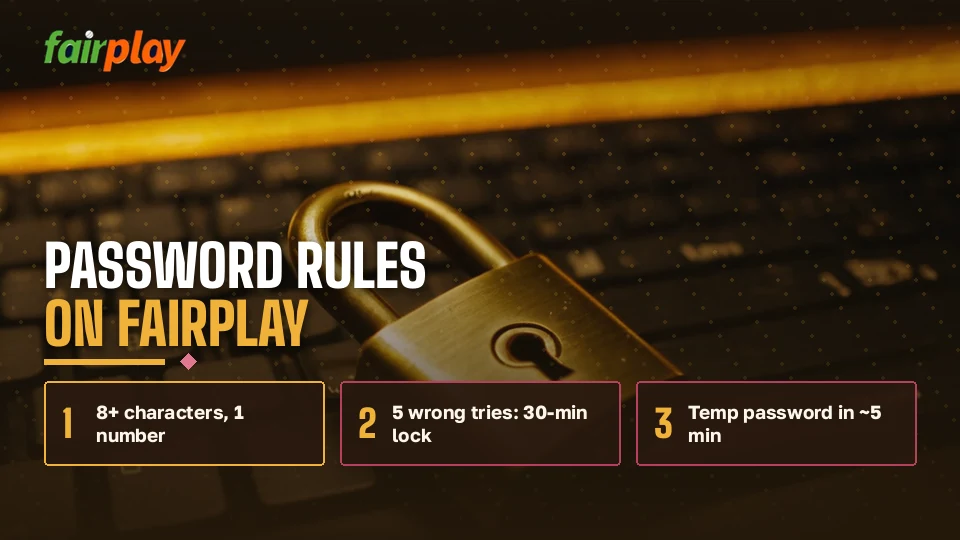
FairPlay Password Rules on One Secure 8-Character Meter
Three checks. That is the full rule set the FairPlay desk works to, and the meter above is a picture of it rather than a live tester (nothing you type on this site is checked or sent anywhere).
- Length
- Eight or more, with no upper limit stated. A five-letter word fails here before anything else is checked.
- Number
- At least one digit, placed anywhere: start, middle or end.
- Temporary password
- Used once to get in. The first login on a new FairPlay ID forces you to replace it, and a reset works the same way.
- Where it works
- App, browser and every live FairPlay address the desk confirms all accept the one password, so a single reset covers the lot.
The third check on the meter has a plain logic. That temporary string is sitting in a WhatsApp thread on your phone, so a brother borrowing the handset to check a score could read it in two scrolls. Replace it and the old line becomes dead text. FairPlay keeps the wallet out of reach until you do, which means every reset finishes on a password nobody else has seen.
Run a a few made-up examples past the meter. A word like sixer fails twice, being five letters with no digit. Something like longonboundary has plenty of length and still fails, because there is no number anywhere in it. Slip a single digit in, longon7boundary, and all three checks pass. These are illustrations of the rule, so please do not reuse one of them as your actual FairPlay login password.
Capitals are where the meter stops helping. If you saved Longon7boundary with a capital L, assume the box wants that L every time; caps lock is one of the two usual reasons behind an Invalid username or password message, and each such miss brings the five-try lock closer. The username box is the forgiving one of the pair, and the FairPlay ID page has its 6-12 character format.
A password you cannot recall the next morning simply sends you back to step one of the ladder. Something from your own cricket memory, a ground or a match you will never forget, with a digit worked into the middle, clears the meter and tends to stick. Skip the obvious shortcut of your username with a 1 on the end; it passes all three checks, yet anyone who knows the username is a single guess away from it.
FairPlay Login Lock After 5 Wrong Tries — the Real 30-Minute Timer
Five wrong FairPlay passwords and the ID locks for 30 minutes. That is the whole mechanism, and it is there to stop someone guessing their way into your wallet.
Because the lock sits on the ID itself, switching from the app to a browser or to another working FairPlay address probably will not get you around it; the same username, password and balance travel to every live address, and so, in practice, does the lock. Nobody at the desk can hurry the clock for you either. Roughly speaking, there are two kinds of people who hit it.
- You know the password. A slipped finger, caps lock left on, an old password typed from memory. Stop at the lock, wait the half hour, then type it slowly.
- You have genuinely forgotten it. Waiting alone will not help. Message the desk with your username for a reset; the temporary password takes about 5 minutes, which is shorter than the lock.
Whether a temporary password goes through before the 30 minutes are over is something the desk confirms in the chat at the time. If it does not, the timer runs out on its own and you sign in then. Either way, firing a sixth and seventh guess at the box gains nothing.
Put real times on it. A lock that lands at 8:10 pm lifts at 8:40 pm. Ask for a reset at 8:11 and the temporary password is usually in the chat by about 8:16, a long while before the timer would have released you.
A better habit: stop after the third miss. At that point you still have two attempts in hand, so pause, check caps lock, check whether you changed the password recently, and only then try again.
One more distinction. A mesage reading Account suspended is not the password lock at all; it points to a duplicate ID and needs the desk, as the FairPlay login problem page explains in its error list.
Fast FairPlay Login Password Reset by Chat — What You Send Here
A fairplay login password reset begins with one WhatsApp message holding your username; the temporary password follows in roughly 5 minutes and you replace it at the sign-in.
- Send the FairPlay username, nothing else
- Receive a temporary password in the same chat
- Set 8 or more characters with one number
Secure Spot to Change My FairPlay Login Password Inside the Account
Anyone who still remembers my fairplay login password and simply wants a new one can skip WhatsApp; the three-box form lives in the account area.
- Open My FairPlay once signed in
- Pick Change Password from the list
- Type old, new and confirm, then save
Official FairPlay Login Password Lock Timer After Five Misses
Half an hour on hold after the fifth miss. A remembered FairPlay password works again at the 30-minute mark; a forgotten one still goes through the chat reset described above.
- fairplay login password
- fairplay login password reset
- my fairplay login password
- fair play password reset
- fairplay password bhool gaya
- fairplay id lock ho gaya
- fairplay change password
- fairplay temporary password
Change My FairPlay Login Password From Inside — Quick Route
Signed in already and simply after a different password? That job never joins the desk queue. My FairPlay carries a Change Password option, the form behind it has a box for today's password plus two for the replacement, and saving it finishes the job with no five-minute wait.
The meter applies here too. Your new FairPlay password needs 8 characters and a number, and if you are changing it straight after a reset, it cannot be the temporary password the desk sent. The username stays exactly as it was; only the password moves.
Notice that this screen asks for your old password. That is fine: it is your own account page, behind your own sign-in. The desk is a different matter and never asks for it, which is the point the next section keeps hammering.
After a change, every FairPlay session on that ID signs out, including the app on your phone, so expect to type the new password on each device; the FairPlay app login page covers the Remember me tick that saves you from doing it every time. The personal area itself, with its wallet, open bets and stake presets, is described on the My FairPlay login page.
When is a change worth doing? After a reset, if the password you picked at the sign-in was rushed and you would rather have something you can remember. Or if a friend watched you type it on a shared screen during a match. Small reasons, mostly. It takes one screen.
Verified FairPlay Reset Rule — the Desk Never Asks for an OTP
Trace the direction information moves in a FairPlay reset. You send a username. The desk sends a temporary password. That is the entire exchange, and nothing about it requires a one-time code from your phone or the password you have lost.
The only OTP in the FairPlay process arrives at sign-up, when a single code goes to your own mobile to open the account; it is for you to enter, never for you to forward to a chat. A reset message that suddenly wants that kind of code, or wants your current password to verify you, has come from somewhere else.
Before trusting any reset reply, glance at the sender. A look-alike usualy differs somewhere in the last few digits, while the real FairPlay line finishes 11726; the FairPlay WhatsApp login number page shows the contact name to save it under. A stranger who messages you first with a password fix on offer is not us.
Already shared a code or a password with a chat that turned out to be fake? Act on it straight away. If you can still sign in, change the FairPlay password from My FairPlay before anything else. If you cannot, send your username to the real desk for a reset, and mention what happened so the person reading it knows why the request is urgent.
Same principle on this site. The Log in and Sign up forms here only open the FairPlay sign-in when you press submit. They store nothing.
FairPlay Login Password: Wait, Reset or Change — Best Pick per Case
Three tools, three situations. Pick by what you actually know about your FairPlay password right now.
| Your FairPlay situation | What to do | How long |
|---|---|---|
| Locked after 5 wrong tries, but you know the password | Wait, then type it carefully | 30 minutes |
| Password forgotten completely | WhatsApp the username for a reset | About 5 minutes |
| First sign-in with a brand-new ID | Replace the temporary password at sign-in | Part of the first login |
| You know it and want a new one | My FairPlay, then Change Password | One screen |
| Invalid username or password, yet you are sure | Check caps lock and any recent change first | Before the next try |
The middle row is where most people land, and it is also the one that tempts guessing. Resist that. Five guesses buys you a 30-minute wait, while one message to the desk buys a working temporary password in about five, so the arithmetic favours asking early.
There is also no spare account to fall back on. FairPlay allows one ID per person, so while the first one is locked or forgotten, the reset or the wait is the only way back in; opening a second ID to get round it is not an option.
Row three catches first-timers out. A very first FairPlay sign-in behaves exactly like the tail end of a reset, with the lobby held back until your own password replaces the one from the chat. How the ID gets issued in the first place belongs to the FairPlay ID page linked above.
The timings differ slightly, though. A new ID usually reaches you in about four minutes, a reset in about five, and in both cases the clock starts when the desk reads your message, not when you send it. If you sent it at the height of a run chase, allow for that.
Proven FairPlay Login Password Checks Before You Ask for a Reset
Plenty of FairPlay password trouble is not really about the password. Run these quick checks first; each one takes seconds and none of them spends an attempt.
- Caps lock and keyboard language. A phone keyboard that switched layout, or a capital letter at the start that the keyboard added on its own, is enough to fail the match.
- Muscle memory. Changed it last week? Thumbs tend to type the previous one, and a browser holding a saved copy will happily autofill the stale version too.
- The address bar. A FairPlay page that will not load at all is an address problem, not a password one. Your password is identical on every live address the desk confirms.
- Session expired. A timer, not a verdict on your typing. Twenty untouched minutes, say a long innings break with the phone face down, and FairPlay ends the session; sign straight back in with what you already use.
- The pasted reset string. Each failed paste counts towards the five-try lock just like a typed guess. So before a second paste, tap at the end of the field and look for a stray space dragged in from WhatsApp.
If the temporary password still fails, reply in the same chat instead of retrying it five times; the desk can see the earlier message and, frankly, a fresh lock helps nobody. The full error list, from blocked addresses to cleared site data, sits on the FairPlay login problem page linked in the lock section.
And if the desk is slow? On busy nights the reply can take around six minutes. Should there be no answer in 20 minutes, the FairPlay login number page explains how to resend with your username so it is picked up.
One last look-alike. Being signed out of the FairPlay app every time you open it feels like a password fault and is not one: it usually means Remember me was left unticked or the phone clears app data in battery saver, and the fix for that sits on the FairPlay app login page. Your password is fine. Leave it alone.
FairPlay Login Password FAQ — Trusted Answers on Resets and Locks
I forgot my FairPlay password — what do I do?
Text your FairPlay username, nothing else, to +91 81097 11726 on WhatsApp. Around 5 minutes later a temporary password appears in that chat. Use it once at sign-in, where you are made to choose your own password of at least 8 characters with a number in it.
How long does a FairPlay password reset take?
About 5 minutes from the moment the desk reads your username. The desk runs 24x7 and normally replies within roughly 2 minutes, closer to 6 on big match nights, so a busy evening can add a little. Setting the new password at sign-in takes moments after that.
Why is my FairPlay ID locked after wrong passwords?
Five wrong password attempts lock the FairPlay ID for 30 minutes. The lock lifts by itself when the half hour ends, so stop typing and wait if you are sure of the password. If you have genuinely forgotten it, ask the WhatsApp desk for a reset with your username.
Will the FairPlay desk ask me for an OTP during a reset?
No. The only FairPlay code you ever handle is the single sign-up OTP, typed by you on the sign-up screen. A reset runs on your username alone, and the desk replies with a temporary password. If a chat wants a code or your old password, stop replying.
How do I change my FairPlay password after logging in?
Open My FairPlay, choose Change Password, then type your current password, the new one and the new one again to confirm. Save it and the new password applies wherever you use the ID. Every signed-in device, including the app, is logged out and asks for it fresh.
What are the FairPlay password rules?
A FairPlay password needs at least 8 characters including at least one number. On your first login with a new ID, or after a reset, you must swap the temporary password for one of your own. That same password then works on every live FairPlay address.