
FairPlay App Login — Fast Phone Sign-In That Stays Signed In
To sign in on your phone, open the FairPlay app, type your username and password, tick Remember me and press log in. That one tick is what keeps the app login alive between visits. If the app still throws you out, battery saver is probably wiping its data, and the fix sits further down this page.

FairPlay App Login Card — Quick Remember Me Sign-In
Same three inputs the app shows you. These boxes are a picture of the screen, not a live form: the button opens this site's own Log In form, and pressing submit there hands you to the secure FairPlay sign-in, with nothing you typed kept here.
FairPlay App Login Screen: Three Inputs and One Official Tick
The first thing the FairPlay app shows after it opens is the sign-in. It is short.
FairPlay app · sign-in
Usernameexactly as the desk sent it
Passwordthe one you set yourself
Remember me
Log in
First launch only: a pop-up asks whether the FairPlay app may send notifications. Allow or refuse, the sign-in works the same.
Username first. It is the name that came in your desk chat when the ID was issued, and it goes in exactly as written, no spaces before or after. The password box wants the password you chose yourself, because the temporary one from the desk is forced out at the very first sign-in (the length and number rules are on the FairPlay login password page). Then the tick. People skip it because it looks optional, and technically it is, but leaving it empty is the single most common reason the FairPlay app asks for the password again every time it is reopened.
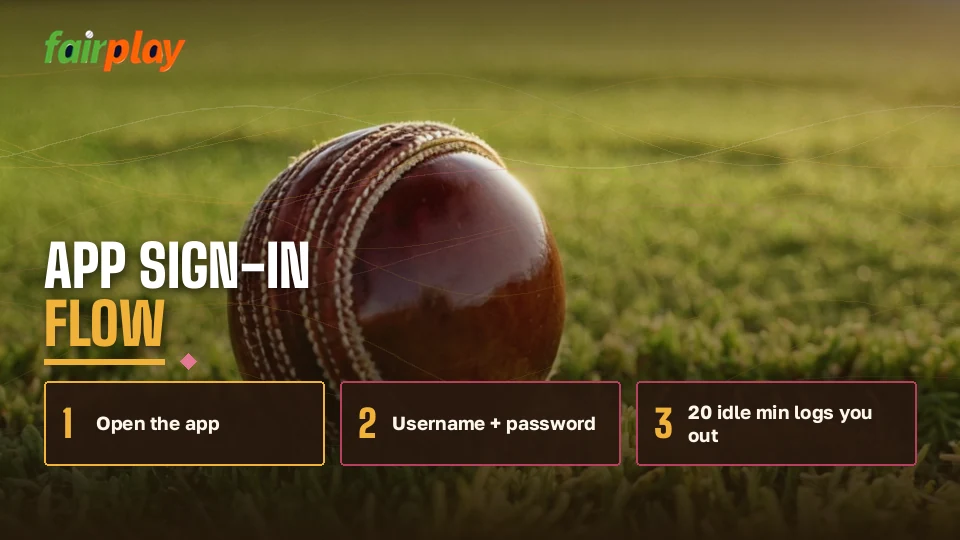
- Tap the FairPlay icon and wait a beat. If the lobby appears instead of the sign-in, an earlier session is still alive and you can stop here. No icon yet? Start on the FairPlay app overview.
- First launch? Answer the notification prompt. Either answer is fine.
- Type the username from your FairPlay desk chat.
- Type your password, and glance at caps lock if it is refused once.
- Tick Remember me and leave it ticked.
- Press log in and you are through to the FairPlay lobby.
Six rungs written out. On the phone it is a few seconds of typing, and after the first time, with the tick on, most of it disappears because the FairPlay app opens straight into the lobby.
Typing trips more people than they expect. Phone keyboards like to capitalise the first letter and add a space after a word, and both get carried into the username box without anyone noticing. The username itself is not case-sensitive, as the FairPlay ID page notes, so a capital letter there does no harm; a stray space can, and so can autocorrect swapping a letter you meant. Passwords are less forgiving. If the FairPlay app refuses one that you are sure is right, tap the field, clear it completely and type it again with the keyboard suggestions in mind, rather than retrying the same saved entry three or four times.
iPhone users get the same screen by a different road. There is no App Store build, so the icon comes from Safari's Add to Home Screen, and it opens the identical FairPlay sign-in with the same username, password and Remember me tick. Everything on this page applies there too, apart from the Android battery menu.
Searches like fairplay login app land on this same screen. There is one FairPlay app, and its sign-in is the part those searches are after; the sports, exchange, casino and Aviator rooms all sit behind it, on one wallet.
My FairPlay App Tab — Live Balance, Exposure and Statement
"My FairPlay app" is what most people call the account tab inside the FairPlay app. You only see it after signing in. Four things live there, and each has one job:
- Balance. What the wallet holds right now, the same figure a browser sign-in would show.
- Exposure. Stake currently committed to markets still running.
- Open bets. Each running bet, listed until its market closes.
- Statement. The record of what moved in and out of the FairPlay wallet.
So a my fairplay app login is really two actions joined together: sign in, then tap across to that tab. Nothing extra to install, no second password.
A quick composite of how it gets used. Someone backs a side in an evening T20, closes the FairPlay app, and opens it again once the match is over. With Remember me on, there is no sign-in screen at all; the account tab shows whether the bet has moved from open bets into the statement, and the exposure figure drops back once it settles.
Reading the the tab takes a moment the first time. Balance and exposure are separate numbers on purpose: the balance is what you could use now, while exposure is what is already committed to bets that are still live. A large exposure with a modest balance simply means a lot is riding on markets that have not finished. When a market settles, the bet leaves the open list, its result lands in the statement, and the FairPlay app recalculates both figures without you doing anything.
The browser version of this area carries a few extras (password change, stake presets and a filtered statement), and those are covered on the My FairPlay login area page rather than repeated here. Same ID, same numbers, slightly different layout.
FairPlay App Login Logouts — Proven Battery Saver and Remember Me Fix
If the FairPlay app asks for your password every single time, there are two usual suspects, and they are easy to tell apart.
The first is the tick. When Remember me is left empty, the FairPlay app treats each visit as a fresh one and returns you to the sign-in screen as soon as it is closed. Fix: sign in once more, tick the box, and that is the end of it.
The second is sneakier, because the tick is on and the logouts still happen. Phones with aggressive battery saving clear the data of apps they think are idle, and the saved sign-in is part of that data. The FairPlay app then wakes up with no memory of you, which looks like a login fault but is really the phone tidying up behind your back. It tends to show up overnight, or after the phone has sat unused for a while, and it is more common on handsets that ship with strong power management switched on by default.
The cure is to take the FairPlay app out of battery optimisation. Menu names differ by phone maker, so the exact path is hard to promise, but on most Android phones it sits in the app info screen for the FairPlay app, under a Battery entry, where the option to stop optimising it lives. Switch that off. Sign in once more with Remember me ticked, and the app should stay signed in from then on.
That is the theory. In practice a few phones also have a separate cleaner or "deep sleep" list, and the FairPlay app has to be kept off that list as well, otherwise the data still gets cleared.
One more case looks similar but is not. A "Session expired" line after you have left the app idle is a time-out, not a wiped sign-in; the FairPlay login problem decoder explains it next to the other error messages.
Where My FairPlay App Login Sits Inside the Phone — Quick Map
A fairplay app login happens on the first screen of the FairPlay app: username, password, Remember me, log in. The my fairplay app tab comes straight after, holding balance, exposure, open bets and the statement.
FairPlay Login App Terms Typed Into the Sign-In Card — Official Wording
Whether you search fairplay login app, fairplay app login or my fairplay app login, the screen is the same one, and the ID matches the browser sign-in exactly.
- my fairplay app: the account tab you reach after the app sign-in
- my fairplay app login: signing in and landing on that tab
- fairplay login app: the sign-in screen inside the FairPlay app
FairPlay App Login Fixes This Page Covers — Fast Answers
Repeat logouts come from an unticked Remember me or from battery saver clearing app data.
A password change elsewhere signs every phone and browser out, so sign in again with the new one.
- fairplay app login
- my fairplay app
- my fairplay app login
- fairplay login app
- fairplay app me login
- fairplay app login kaise kare
- fairplay app remember me
- fairplay app logout problem
FairPlay Login App Troubleshooting — Fast Fixes by Symptom
Find the line that matches what your phone is doing. Most FairPlay app sign-in trouble falls into one of these rows, and the fix column is the order to try things in.
| What the FairPlay app does | Likely cause | Fix |
|---|---|---|
| Logged out every time it is closed | Remember me was left unticked | Sign in again and tick the box before pressing log in |
| Logged out overnight, tick already on | Battery saver cleared the app data | Turn battery optimisation off for the FairPlay app, then sign in once more |
| Signed out on the phone and the laptop at once | The password was changed somewhere | Changed it yourself: type the fresh one. Never changed it: text the desk with your username before signing in again |
| Password refused right after a change | The old password is still being typed | Type the new one slowly, caps lock off |
| ID locked after repeated wrong tries | Too many failed attempts | Wait out the lock; timings are on the password page |
| Update prompt, then no sign-in screen | An old APK is still installed | Remove it and install the fresh build from the desk |
The third row deserves a second look. A sign-out on every device at the same moment almost always means a password change, and if that change was not yours, treat it as urgent and text the desk at +91 81097 11726 before doing anything else in the FairPlay app; the FairPlay login number page says what to put in the first mesage.
The lock row is short on purpose. Five wrong tries lock a FairPlay ID for a while, and the exact wait sits with the reset steps on the FairPlay password reset page. The update row is covered on the FairPlay login update page, which explains why the username, password and balance survive a reinstall.
None of these rows need a new ID.
Work down the table from the top. The first two rows account for most FairPlay app logouts, so checking the tick and the battery setting before anything else usually saves a message to the desk.
FairPlay App Login and Browser Together — Safe on One ID
Running the FairPlay app on the phone while a laptop tab holds the browser sign-in causes no conflict. A bet placed on one appears on the other, and the wallet figure matches on both, since each screen is just a window onto one account.
Why would anyone run two? A bigger screen for the exchange ladders while the FairPlay app stays in a pocket, mostly. Or a shared laptop at home where the browser is the easy option, with the phone as the backup when someone else needs it.
One rule to keep in mind
A password change signs every device out. Change it in the browser and the FairPlay app drops you to the sign-in screen too, and the reverse is true as well. Expect it, then sign in on each screen with the new password.
That rule is worth repeating in different words, because it confuses people more than anything else on this page: after a new password, no FairPlay session survives anywhere, and that is the intended behaviour rather than a fault in the app.
There is one practical difference between the two. The browser needs a working FairPlay address, and addresses do get blocked in India from time to time, while the app sign-in screen stays where it is. Either way the ID never changes; the same username, password and wallet work on every live address the desk confirms.
Here is how the the password rule plays out on a normal evening. Say the FairPlay app is signed in on your phone and a browser tab is open on the family laptop. You change the password from the laptop. Within a moment the laptop wants the new password, and the next time the phone app is opened it shows the sign-in screen instead of the lobby. Type the new password on the phone, tick Remember me again, and both screens are back to normal. Nothing about the wallet changes in between; only the sessions end.
Some people ask the desk for a separate phone ID. Not possible, and not useful: the rule is one ID per person, and the FairPlay app takes the username you already hold. A new ID is only issued when the old login and the old mobile are both lost, and the FairPlay login ID page sets out that case.
My FairPlay App Login First Launch — Free Notification Choice
The first time the FairPlay app opens, before or around the sign-in, the phone asks whether it may send notifications. Optional. Refusing it does not block the login, the account tab or anything else in the lobby, and allowing it does not change the password or the username.
What the alerts carry is limited: match starts and settled bets, as the FairPlay app page lists. Some people like the settled-bet ping because it saves opening My FairPlay to check a result. Others find a match-start alert on a double-header evening a bit much (fair enough).
Changed your mind later? The switch lives in the phone's own settings for the FairPlay app, not inside the FairPlay sign-in, so turning alerts on or off never logs you out.
One small wrinkle. The prompt belongs to the first launch of an install, so if the FairPlay app is ever removed and installed fresh after an update prompt, it will probably ask again. Same choice, same result: the answer has no effect on the sign-in, and your username, password and balance carry over to the new install untouched.
FairPlay App Login Help — 24x7 Desk When Sign-In Still Fails
If the battery fix, the tick and the troubleshooting rows have all been tried and the FairPlay app still will not let you in, text the desk. The line is +91 81097 11726, WhatsApp text only, staffed around the clock. A first reply usually comes inside about 2 minutes, and on big match nights it can stretch to roughly 6.
Start with your username. That one detail lets the desk find the FairPlay ID without a back-and-forth, and the FairPlay WhatsApp login number page has the rest of the message format and how to spot the fake numbers that circulate.
Forgotten passwords have their own home: the FairPlay password page holds the reset steps and how long each one takes. Keep one thing from it in mind here, though. Whoever asks you for an OTP, or for the password you used before, is not the FairPlay desk.
A useful first message is short and specific. Something like: your username, then "FairPlay app logs me out overnight, Remember me is on, battery optimisation already off". That tells the desk which rows of the table above are ruled out, so the reply can start from what is left instead of from the beginning. The same goes for a password problem; say whether the FairPlay app refused the password or showed a lock, because those two take different routes.
Timing on a busy night has a pattern too. Password resets sit fourth in the desk queue, behind new IDs, deposits and withdrawals, so a reset request during a big match can wait a little longer than a quick question would. If twenty minutes pass with no answer, send the message again with URGENT in front of your username; the FairPlay number page explains that resend rule in full.
Everything above assumes a username already exists. No username, nothing to sign in with: the FairPlay ID page covers how the desk issues one.
FairPlay App Login Questions — Verified Short Answers
How do I log in to the FairPlay app?
Open the FairPlay app, type the username from your desk chat and your own password, tick Remember me and press log in. The first launch also asks about notifications, and either answer works. If the password fails, the reset runs through the desk on WhatsApp at +91 81097 11726.
Why does the FairPlay app keep logging me out?
Usually one of two causes. Either Remember me was left unticked, or the phone's battery saver is clearing the app's data in the background. Tick the box at the next sign-in and turn battery optimisation off for the FairPlay app in your phone settings, which normally ends the repeat logouts.
What is the My FairPlay app?
My FairPlay app means the account tab inside the FairPlay app, not a second download. Tap it after signing in to see balance, exposure, open bets and the statement. Reached from a laptop browser, the identical account appears with identical numbers, since one username covers both routes.
Will a FairPlay browser login kick me out of the app?
No, the browser and the FairPlay app can hold the same ID side by side, both reading one balance. The only thing that ends both sessions together is a password change, and after that each screen needs the new password typed once, with Remember me ticked again on the phone.
Do I have to allow notifications on the FairPlay app?
No. The notification prompt appears on first launch and is optional, so sign-in works whether you allow it or not. The alerts cover match starts and settled bets, and you can switch them off later in your phone settings without touching your FairPlay login at all.