
FairPlay App — Real Pocket Lobby With One Login for Every Game
Download the FairPlay app on Android as a 16 MB file from the desk chat, or put a home-screen icon on your iPhone through Safari, and log in with the username and password you already use. Inside sit the sportsbook, exchange, live casino, Aviator, your wallet and bet history. One ID covers all of it.

FairPlay App Secure Sign-In, Laid Out the Way the Phone Shows It
This card copies the screen the FairPlay app puts up on launch, with its username box, password box and Remember me tick. It is only a picture of that screen, so the boxes are locked.
The live fields sit behind the button, on the secure FairPlay sign-in. If the app keeps logging you out, the usual fixes are on the FairPlay app login help page.
FairPlay App on Android or iPhone — a Fast Side-by-Side Before You Start
Two phones, two routes, one account. Pick the card that matches the handset in your pocket; whichever you choose, the FairPlay app lobby behind the login is the same set of games and the same wallet.
Android handset
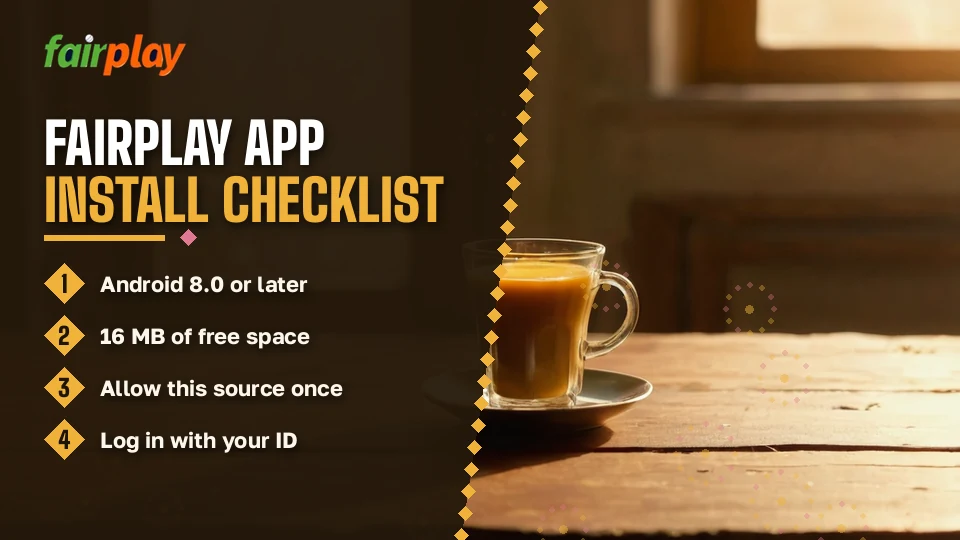
- A real APK of about 16 MB
- Runs on Android 8 (Oreo) or newer
- The link arrives in the WhatsApp desk chat
- Alerts for match start and settled bets
- Updating means a fresh file from the desk
iPhone
- No App Store listing at all
- Safari, then Share, then Add to Home Screen
- The icon opens the same FairPlay login
- Nothing downloads, nothing installs
- Same username, password and balance
Which route suits you comes down to the handset, not the account. An Android install keeps its own icon, its own remembered sign-in and its own alerts, and it opens without a browser in the way. The iPhone icon is a pinned shortcut to the FairPlay sign-in sitting among your other apps (no file, no install, no storage to clear). Hard to call one better than the other; both stop at the same FairPlay username prompt.
Some readers carry both. That works too.
The ID is not tied to a handset, so a player can sign in on an Android phone at home and on an iPhone at the office with identical details, and a laptop browser is a third door into the same room. Nothing has to be registered twice, and there is no second wallet waiting to be topped up.
Changing phones follows from that. On a new Android handset, ask the desk for the link again, install the FairPlay app, sign in with the old username and password, and the balance and bet history are already there; nothing has to be carried over from the old device. Moving from Android to an iPhone is the same story, only with an icon instead of a file.
Inside the FairPlay App — the Real Screens Behind One Login
- LobbySportsbook for cricket, football, tennis, kabaddi and horse racing, plus the back/lay exchange, dealer tables and Aviator from one menu.
- WalletOne rupee balance that sports and casino both draw from.
- Deposit and WithdrawThe same two buttons the website has, feeding the same desk queue.
- Bet historyOpen and settled bets, the quickest check after a long match.
- Push alertsA ping at match start and another when a bet settles; both can be muted.
That list is the whole FairPlay app, more or less. It carries the full lobby rather than a trimmed companion: cricket and football markets, the exchange with its back and lay prices, the dealer tables and the Aviator flights all come through the single sign-in, and prices only show once you are logged in. The tiles on this site's home page follow the same groups the operator lobby uses (Live Casino, Crash & Instant, Cricket, Table Games, New on FairPlay), so the FairPlay login lobby is a fair preview of what the app shows after sign-in.
The casino side is usually what people ask about next. Dealer tables such as teen patti, andar bahar and roulette run around the clock, and the FairPlay casino page lists the rest with their table limits; Aviator, the crash game where you cash out before the plane leaves, has its own FairPlay Aviator page. In the app both sit under the same lobby menu as cricket, so moving from a match to a table takes a tap rather than a second login.
Money moves through the wallet screen. There is one balance. Sports and casino draw from it, so nobody has to shift funds between a cricket pot and a casino pot before a session. Deposits go in by UPI, IMPS or bank transfer from ₹300, with the details on the home page; UPI withdrawals usually land in 25-45 minutes, and the FairPlay withdrawal time page carries the bank figures and limits.
Bet history gets more use than people expect. After a a double-header it is the fastest way to see what settled and for how much, without scrolling back through chat. The fuller account area, with balance, exposure, statement filters and stake presets, is laid out on the My FairPlay login page; the FairPlay app shows that same area under its account tab.
A typical evening, roughly: an alert says the match has begun, the FairPlay app opens straight into the lobby because Remember me was ticked, a bet goes on during the first innings, and later a second alert says it has settled. No browser tab. No address to look up.
FairPlay App Size and Phone Needs — Verified Numbers in One Ledger
Four lines decide whether the FairPlay app will run on your phone, and none of them is complicated.
- File size
- About 16 MB for the Android APK. A file far bigger or far smaller is not the one the desk sends.
- Android release
- Android 8, the release Google named Oreo, or anything newer.
- iPhone route
- No App Store build. Safari, then Share, then Add to Home Screen.
- Where the link comes from
- The WhatsApp desk chat on +91 81097 11726, never a Play Store page or an APK mirror site.
Start with the Android number. Open Settings, then About phone, and the Android release is listed there; some brands tuck it one level deeper under Software information. Anything from 8 upward is fine for the FairPlay app. Below that, use the browser sign-in instead, since it is the same ID and the same wallet and nothing is lost by skipping the install.
A parent's old handset stuck on Android 7 is the classic case. The FairPlay app is out for that phone, yet the ID still works in its browser; just check the address bar shows the address the desk sent before any password goes in.
Then the size. Sixteen megabytes is small for a betting lobby, small enough that mobile data handles it without fuss. Installing needs more room than the download itself, about 60 MB free, and the FairPlay app download steps cover that along with the one-time permission Chrome asks for before it will install a file. The size doubles as a check, too: if the file you were handed is wildly off 16 MB, it did not come from the desk, whatever its icon claims.
Where the link comes from is the last line of the ledger and probably the one that matters most. The FairPlay app is handed out as a link inside the desk chat, full stop. Message the desk on +91 81097 11726, text only, with the number details kept on the FairPlay login number page, and the link arrives in that same thread.
Where the FairPlay App Search Lands on This Page — Quick Map
Someone typing fairplay app usually wants one of three things: the file, the login, or a yes or no on iPhone. This page covers what the FairPlay app holds and which phone route fits; the fairplay app download and fairplay app apk steps live on their own page, and fairplay app login trouble has another.
- fairplay app for android, answered by the 16 MB APK and the Android 8 floor above
- fair play app on iPhone, where the answer is a pinned Safari icon rather than any store listing
- my fairplay app searches, which point at the in-app account tab and belong to the app login page
- fairplay app whatsapp, which is the desk line that sends the install link
FairPlay App Searches This Desk Answers Fast
In brief, for anyone skimming: one ID, one wallet, three ways in.
- Android owners request the FairPlay app link in chat and install the 16 MB file
- On an iPhone, a Share-sheet shortcut in Safari stands in for the missing FairPlay app download
- Laptop users open the browser sign-in with the same username
Typed spellings such as fairplay, fair play app or fairply all point at the same account and the same answer here.
- fairplay app
- fair play app india
- fairplay mobile app
- fairplay app iphone
- fairplay app size
- fairplay apk 16 mb
- fairplay app play store
- fairplay app notification off
- fairplay app kaise chalaye
- fairplay app wala login
FairPlay App on iPhone — the Free Safari Home-Screen Icon
There is no FairPlay app in the App Store, so iPhone owners make their own icon. Nothing downloads and nothing installs.
- Open Safari and load the FairPlay sign-in address the desk sent you, or press any Log In button on this site and submit the short form.
- Tap Share in the Safari toolbar.
- Scroll the share sheet and choose Add to Home Screen.
- Keep the suggested name or type FairPlay, then tap Add.
- Close Safari, tap the new icon and sign in with your usual username and password.
That icon runs on the same login as everywhere else. Username, password, wallet and bet history are not kept separately for the iPhone, so a deposit made from an Android phone in the morning shows up on the iPhone icon too, and a bet placed from the icon appears in the Android app's history.
One catch.
The icon remembers the address it was created from. FairPlay addresses get blocked in India from time to time and the desk moves players across to a new one; when that happens the old icon opens a page that will not load, which can look like the account has gone when it has not. Delete the icon, open the fresh address the desk sends, and add a new one. How to tell a genuine new address from a forwarded fake is explained on the FairPlay login update page. Your ID does not change when the address does, and neither does the balance.
For the same reason, anything in the App Store calling itself FairPlay is not something this desk issues.
Browsing in Chrome or another app on the iPhone the rest of the time? Open the address in Safari anyway for this one job, because the steps above are the Safari route and the icon it makes is the one the desk can help with.
Getting rid of the icon later is the usual long-press, then Remove, then Delete from Home Screen. That removes a shortcut and nothing else: your FairPlay account, wallet and history stay exactly where they were.
FairPlay App Lookalikes on Play Store — Proven Way to Spot the Genuine File
Play Store search warning for anyone hunting the FairPlay app
Type FairPlay into Play Store and you get a page of apps that happen to share the name: coupon apps, food apps, sports club apps. None of them is the FairPlay betting lobby. The real Android file comes from exactly one place, a link in your desk chat.
Name clashes are common on app stores, and FairPlay is a short, ordinary phrase, so those lookalikes are mostly just other businesses rather than traps. The trouble starts when a player installs one in a hurry, types a FairPlay username and password into it, and hands those details to a stranger. That is the scenario worth avoiding.
The checks are short. The file name should end in .apk. Its size should sit close to 16 MB. The link should have arrived in your own chat with the desk, not in a forwarded message, a group or a search result. Copies picked up from apkpure-type mirror sites belong in the bin even when they look identical, and the FairPlay APK install page explains what to do after deleting one.
Two more signals concern people rather than files. The desk never asks for your OTP or your old password; whoever does is not the FairPlay desk, whatever the profile picture shows. Fake WhatsApp numbers do circulate as well, and the real FairPlay line ends in 11726.
Already typed your details into a a lookalike? Deal with the password first. Inside the real lobby, My FairPlay has a Change Password option that asks for the old password, a new one and a confirmation; if you cannot get in at all, send your username to the desk and a temporary password comes back, usually in around five minutes. The FairPlay login password page sets out both routes. After that, uninstall the lookalike so the same slip cannot happen twice.
Not sure about a file? Send its name and size to the desk before installing it.
FairPlay App Push Alerts — Free Control From Your Phone Settings
Two kinds of alert come from the FairPlay app on Android.
Match start. A ping when a fixture you follow gets under way, handy if you set a bet up early and then put the phone down.
Settled bet. A ping once a bet is settled, with the result waiting in bet history when you open the app.
Neither is compulsory. On first launch the FairPlay app asks for notification permission, and declining is fine; you can change your mind later from the phone's own settings. On most Android phones the path is Settings, then Apps, then FairPlay, then Notifications, where both alerts can be switched off together or one at a time. Long-pressing an alert as it arrives usually opens the same switch faster.
Turning alerts off changes nothing about the account itself. Bets still settle, history still records them and the wallet still updates; you simply find out when you open the FairPlay app instead of when the phone buzzes. One sensible split during a long tournament is to keep the settled-bet alert and mute the match-start one, though that is a matter of taste.
Some phones go further than muting. Aggressive battery savers can close the FairPlay app in the background and, on certain models, wipe the saved sign-in along with it. Logged out every single morning? Take the app off battery optimisation; that is the usual cure.
FairPlay App or Browser — the Same Trusted ID, Wallet and Desk
The FairPlay app is a door, not a separate account. Whatever happens inside it (a deposit, a bet, a withdrawal request, a change to stake presets) is there the next time you sign in from a browser, because it is one ID sitting on one wallet.
Sometimes the browser is simply the better door. On a shared family computer, for example, sign in through the browser and sign out when you finish, since a ticked Remember me on a machine other people use keeps your FairPlay session open for the next person who sits down.
Both can be open at once. The app and a browser can be signed in on the same ID at the same time, which suits a big match night with a laptop on the table and the phone in hand. Change the password, though, and every device is signed out together; the FairPlay app sign-in fixes cover that, along with the Remember me and battery-saver logouts some phones cause.
Updates work differently from Play Store apps. When the FairPlay app shows an update prompt, uninstall the old APK and install the fresh file the desk sends; username, password and balance carry across untouched. Older builds are not handed out for rollback, because only the newest build is supported. That page, the FairPlay update notes, also covers what happens when the login address itself changes.
Behind all of it sits a WhatsApp text line staffed 24x7. First replies usually come inside about two minutes, closer to six on big match nights, and voice calls are not answered. Start each message with your username so the account can be found straight away. A small aside about this site's own buttons: the Log In and Sign Up buttons here open a short form, and pressing submit passes you on to the secure FairPlay sign-in, with nothing you type stored on our side.
FairPlay App Questions — Real Answers From the Login Desk
Is there a FairPlay app on the Play Store?
Not the one this desk issues. Play Store results for the name belong to other businesses, a coupon app, a food brand, a few sports clubs, and none of them opens a FairPlay betting wallet. The Android file this page describes weighs about 16 MB and reaches you only as a link in your WhatsApp chat with the desk.
Does the FairPlay app work on iPhone?
It does, minus the download. iPhone owners pin the FairPlay sign-in to the home screen through Safari, the Share sheet and Add to Home Screen. The pinned icon lands on the very login an Android phone uses, so a deposit made on one handset is visible on the other one too.
How big is the FairPlay app?
The Android APK is about 16 MB and needs Android 8 (Oreo) or newer. A file much bigger or smaller than 16 MB is not the one the desk sends, so delete it. The iPhone route downloads nothing at all, because it is only a Safari home-screen icon.
Is the FairPlay app safe to install?
Install only the APK whose link came from your own desk chat, check that the name ends in .apk and the size sits close to 16 MB, and remove copies taken from APK mirror sites. The desk never asks for an OTP or your old password, so treat any such request as fake.
Is the FairPlay app login the same as the website login?
It is one and the same. A FairPlay ID issued by the desk is accepted by the Android app, the iPhone icon and a browser on any live address, all drawing on one balance. Running app and browser side by side is allowed; a password change, though, logs both out at once.
Can I turn off FairPlay app notifications?
Yes. The app sends alerts when a match starts and when a bet settles, and both can be switched off in your phone settings under the app's notification options. The first launch also asks for notification permission, and that permission is optional, so declining it there is fine.
How do I update the FairPlay app?
Updating means a swap rather than a patch. Uninstall the installed APK, then install the newest file the desk posts in your chat; the login details and the balance survive the swap untouched. The desk keeps no older builds on offer, so the latest FairPlay app file is the only one it supports.